
Changelog: Sentence Decks, Recommendations, Analytics and Momiji Goes Live
What changed in Momiji this week
After the last post I said I would focus on one feature at a time, finish it, and get Momiji somewhere I would actually want to use every day. This is what came out of the last week or so. Most of it is one big feature (sentence decks), but a lot of smaller things got finished along the way.
Highlights
- Sentence decks: study your own sentences with spaced repetition, with words found, translated and tracked for you.
- Recommended next: the dashboard now suggests which words to learn next, and why.
- Analytics overview: streak, retention, a year heatmap, and a forecast of what is coming due.
- Dark mode and a Settings page, plus the ability to delete your account.
- Momiji is live at momiji.app, running on my own servers with monitoring.
Sentence decks
This is the big one. You can now make a deck of your own sentences: lines from an episode you paused on, something from a book, a phrase a friend sent you. Paste them in (one per line, or split at sentence ends, or a TSV with translations) and Momiji finds every word in them using the same matcher that builds the anime word lists.
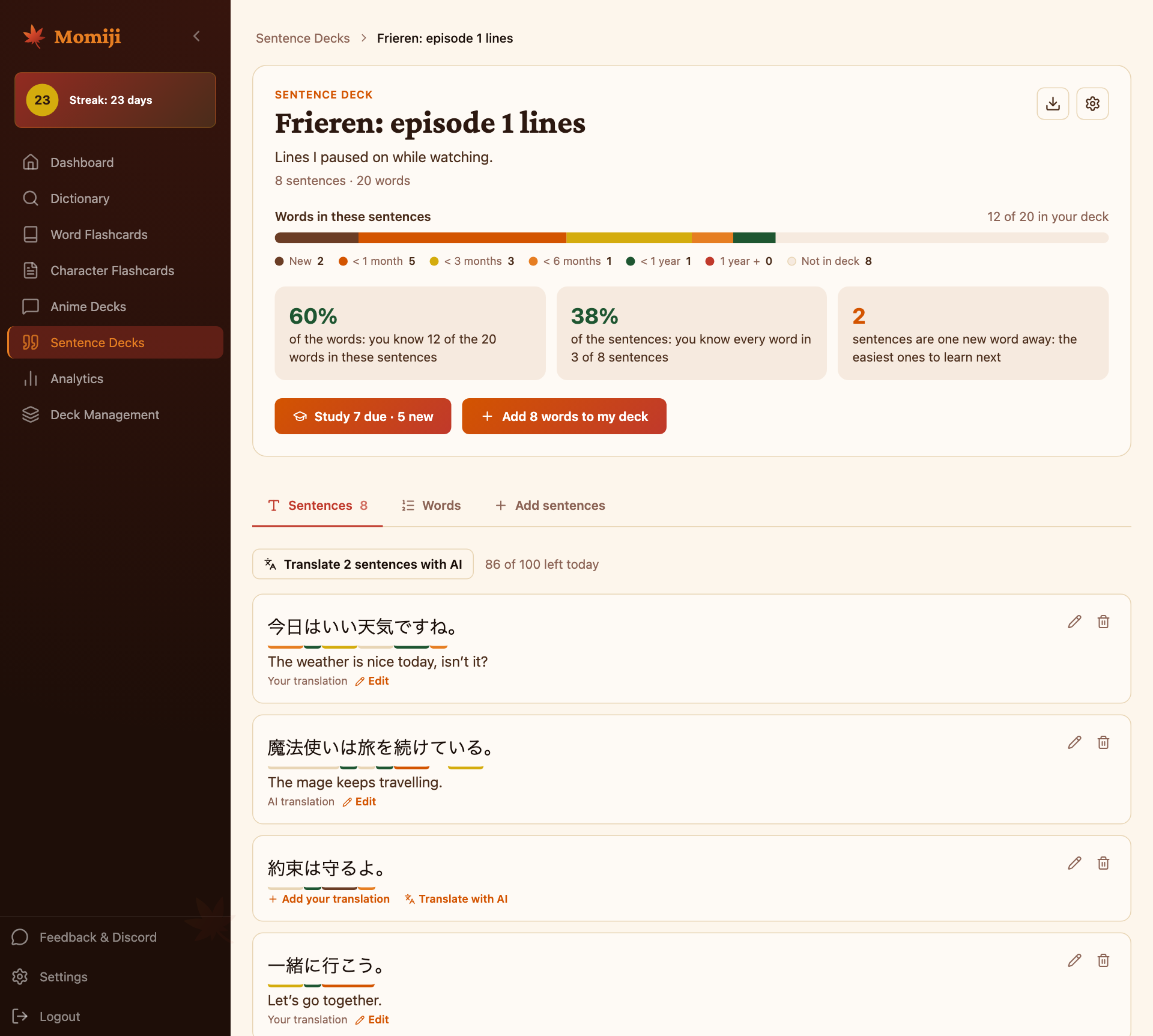
- Progress on every word. Each word is underlined in the colour of how well you know it. If the parser picked the wrong dictionary entry you can click the word to choose another meaning, mark it as not a word, or hand it back to the parser.
- Readability. The deck page shows how much of the deck’s vocabulary you know (6 of 20 words, 30%), how many sentences you can read completely, and the closest next step: sentences that are one new word away.
- Study them with FSRS. Sentences have their own review page with a furigana toggle (readings over the kanji only) and no underlines on the front, so they don’t give hints. Click or press space to see the translation and every word with its reading and meaning, then answer Again, Hard, Good or Easy (keys 1 to 4).
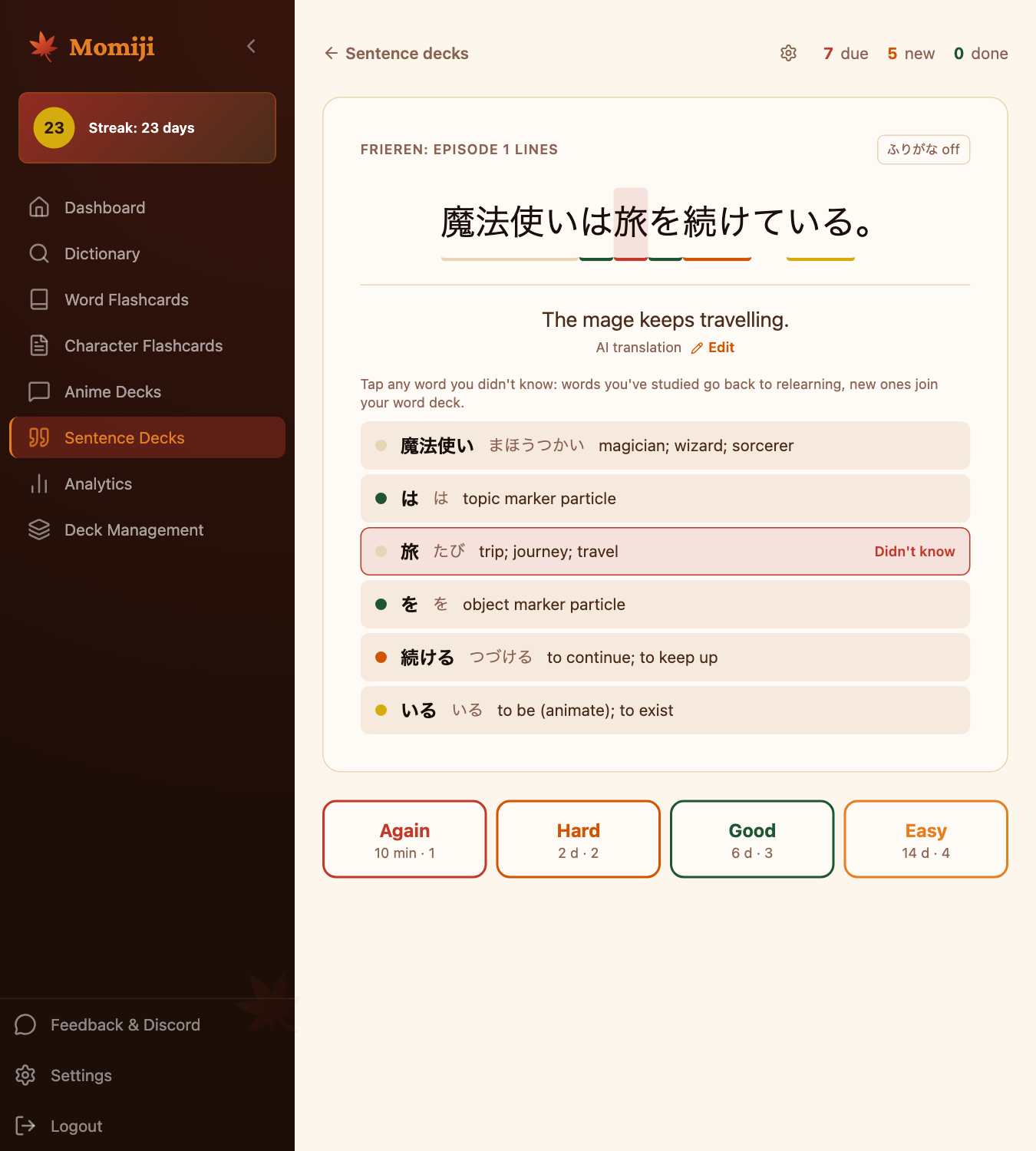
- Sentence reviews feed your word cards. Tap a word you didn’t know while reviewing: if you have studied it, it goes back to review; if you haven’t, it is added to your word deck (or to the front of the line, or just noted; it is your choice). When you pass a sentence, the other words in it that are due today get credit too. It never happens from a failed sentence, and never for new cards. All of this is in a new Study section on the Settings page, and each word review is logged with where it came from.
- Translations. You can add your own translation in place, or ask for an AI translation of one sentence or a whole deck (limited to 100 a day). Every translation says whose it is, and the AI never overwrites one you wrote. If the AI runs out of credits, sentences are still parsed with the likeliest dictionary entry and get fixed up later.
- Sentences show up elsewhere. The back of a word flashcard shows up to two of your own sentences with the word highlighted, dictionary results say “In N of your sentences”, and the dashboard has a Sentences Due histogram.
- Export and import. Decks are shared only as files. Export a Momiji deck file, a TSV, or an Anki package (with furigana in a reading field). Add “include my review progress” to make a backup. Imports treat the file as untrusted: sizes, counts and every field are checked.
Recommended next
The dashboard has been redesigned to match the anime pages, and it has a new Recommended next section. Words you don’t have a card for are ranked by how common they are, how well you know their kanji, whether they show up in a series you study or in your sentence decks (especially as the last unknown word in a sentence), and how close they are to your JLPT level. Every recommendation says why, and adding one to your deck is a single click.
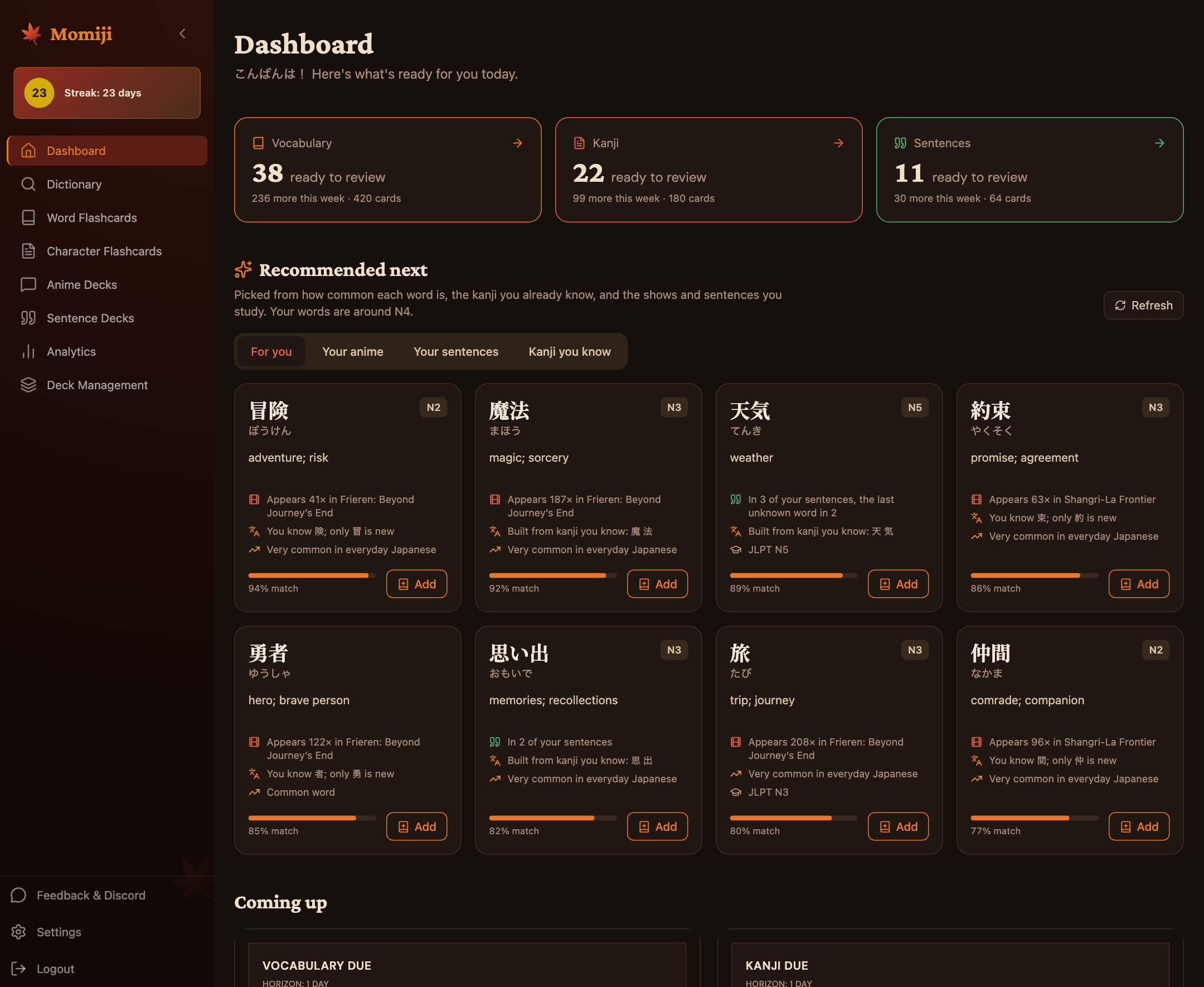
The tabs narrow it down to your anime, your sentences, or kanji you know. The kanji tab lists words made from kanji you already know and ranks them by how shaky those kanji still are, so it practises what you are still learning. The due histograms also stopped resizing the card when you drag the slider.
Analytics overview
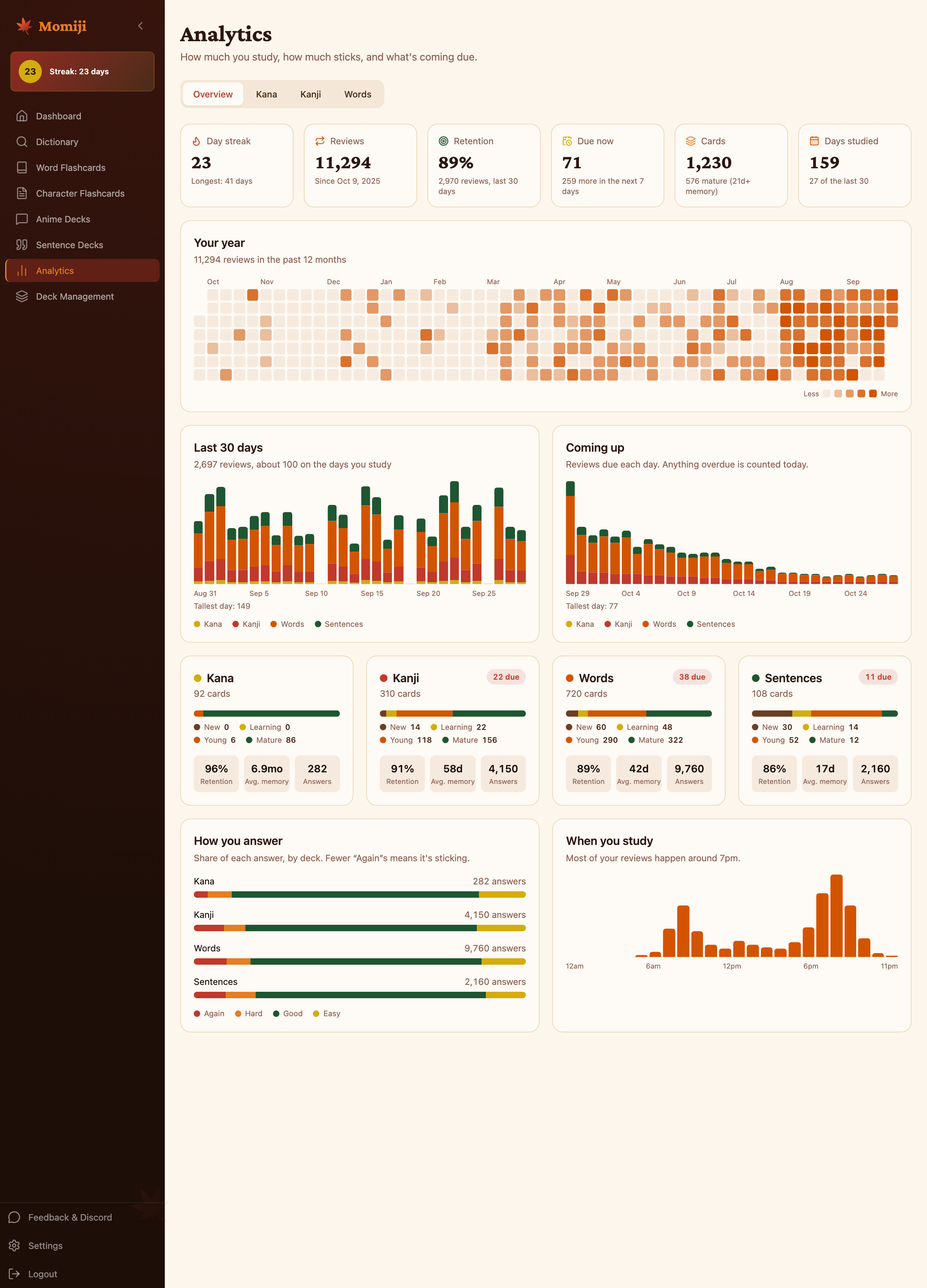
The Analytics page has a new Overview tab that pulls together kana, kanji, words and sentences: day streak, total reviews, retention, what is due now, a heatmap of the past year, the last 30 days, a forecast of upcoming reviews, per-deck maturity, how you answer, and what time of day you study. The old kana, kanji and words progress views are still there as tabs.
Dark mode, Settings and your account
- Dark mode. The whole app now has one, and the Word Study banner and white text got softened in dark mode.
- Settings page. Theme (System, Light or Dark), your study settings and your account are now in one place at the bottom of the sidebar.
- Delete your account. You can now delete your account and all your data from Settings (type DELETE to confirm).
- Privacy policy and terms were rewritten to describe what Momiji actually does, ahead of Google’s OAuth review. The login and setup pages were also themed to match the app.
Anime and deck pages
- The anime pages and the deck management page were redesigned, with the Momiji palette applied across the remaining pages.
- The anime word list now has numbered pages, and its “In deck” filter was fixed.
- The Vocabulary Due histogram shows each word once, and a card counts as due only after its review time has actually passed.
- The Anki export now includes your review history and last review time.
Dictionary
- Dictionary search is faster and handles words that could be either romaji or English.
- Search boxes no longer auto-capitalise or autocorrect on mobile, which mangled romaji and Japanese queries.
Better anime word counts
The pipeline that counts words in each anime got more accurate this week:
- Character and place names are now found automatically (an AI sorts names from vocabulary in a few batched requests per series). The biggest error before was フリーレン being counted as “free” 299 times.
- Katakana that the tokenizer cut badly is split again into the fewest, most common dictionary words.
- Hand-made corrections can now skip a word and target part of a longer katakana word, and I fixed a shared list that was overriding the matcher on hundreds of rows.
- A run can now pick which series to process.
Momiji is live at momiji.app
- Production moved. Momiji now runs on my own servers, and momiji.app was cut over from AWS. The dev site at dev.momiji.app is a separate environment with its own login project.
- Public site and app deploy separately. The landing page is prerendered with better SEO basics, and the landing screenshots were refreshed.
- Monitoring. Both APIs expose metrics, and there are now dashboards, logs and alerts for dev and prod. The data pipelines have their own dashboard, with a “how to read this” guide.
- Safer data pipelines. The dictionary pipelines are safe to run on a database with users, and there is a command to promote dev’s reference data to prod.
Smaller things
- A new logo. Kaede, a flat Japanese maple leaf, replaces the old picture-style maple and emoji in the app, the landing page and the blog.
- The blog is now Momiji-branded at blog.momiji.app.
- The sidebar and help panels link to the Discord.
- Analytics consent banner and key events for the public site.
- Fixes: a fresh login is no longer reported as an expired session, and the user setup page no longer hangs.
- Terms now name Texas law, and the privacy policy says where Momiji is based.
- Dependencies were upgraded, including Node 24 LTS.
What’s next
Sentence decks are built end to end, so the next step is using them a lot and seeing what is rough. I’d like to hear what you think. Come say hi on the Discord (linked from the sidebar in the app).