
Changelog: Sentences for You, Scanning Pages, and Sharing Your Progress
What changed in Momiji since the last post
The last post was only two days ago, but a lot has happened since. That post was about grammar. This round is mostly about sentences: finding good ones to learn from, and getting them out of the books and manga you already have. I’ve also changed how Momiji describes itself. It started as “learn Japanese from anime”, but what I actually want is for you to learn from whatever you love, and that could be a novel, a manga, a game or a show. Anime is still a big part of Momiji, but it isn’t the only way in anymore.
Highlights
- Sentences for you: real sentences where exactly one thing is new. It’s in testing with a few people first.
- Scan sentences from a photo, a picture or a PDF straight into a sentence deck, including whole book pages.
- Words by level: browse every JLPT level’s vocabulary, most common first, and add it to your deck.
- Better JLPT levels for words, worked out per reading instead of per entry.
- Grammar round 2: 179 more points, for 519 in all.
- Share your progress with a public page, a card and a badge showing your estimated JLPT level.
- A community page showing what everyone on Momiji is studying.
- Kana and kanji get their own pages, and some smaller fixes.
Sentences for you
The best sentences to learn from are ones where you know everything except one thing. If there are three new words in a sentence, you’re decoding, not learning. If there are none, you’re just reviewing. This is usually called i+1, and finding those sentences by hand is a lot of work, so Momiji now does it for you.
The Sentences page has a new Sentences for you section. Each sentence has one new word or grammar point marked in it. Everything else in it is something you’ve already studied. Under the sentence it tells you what’s new and what it means, and the translation is hidden until you tap Show translation so you can try reading it first. Add puts it into a “Sentences for you” deck, and Not for me hides it. You can switch between For you, New words and New grammar, and furigana and romaji work the same way they do on the grammar pages.
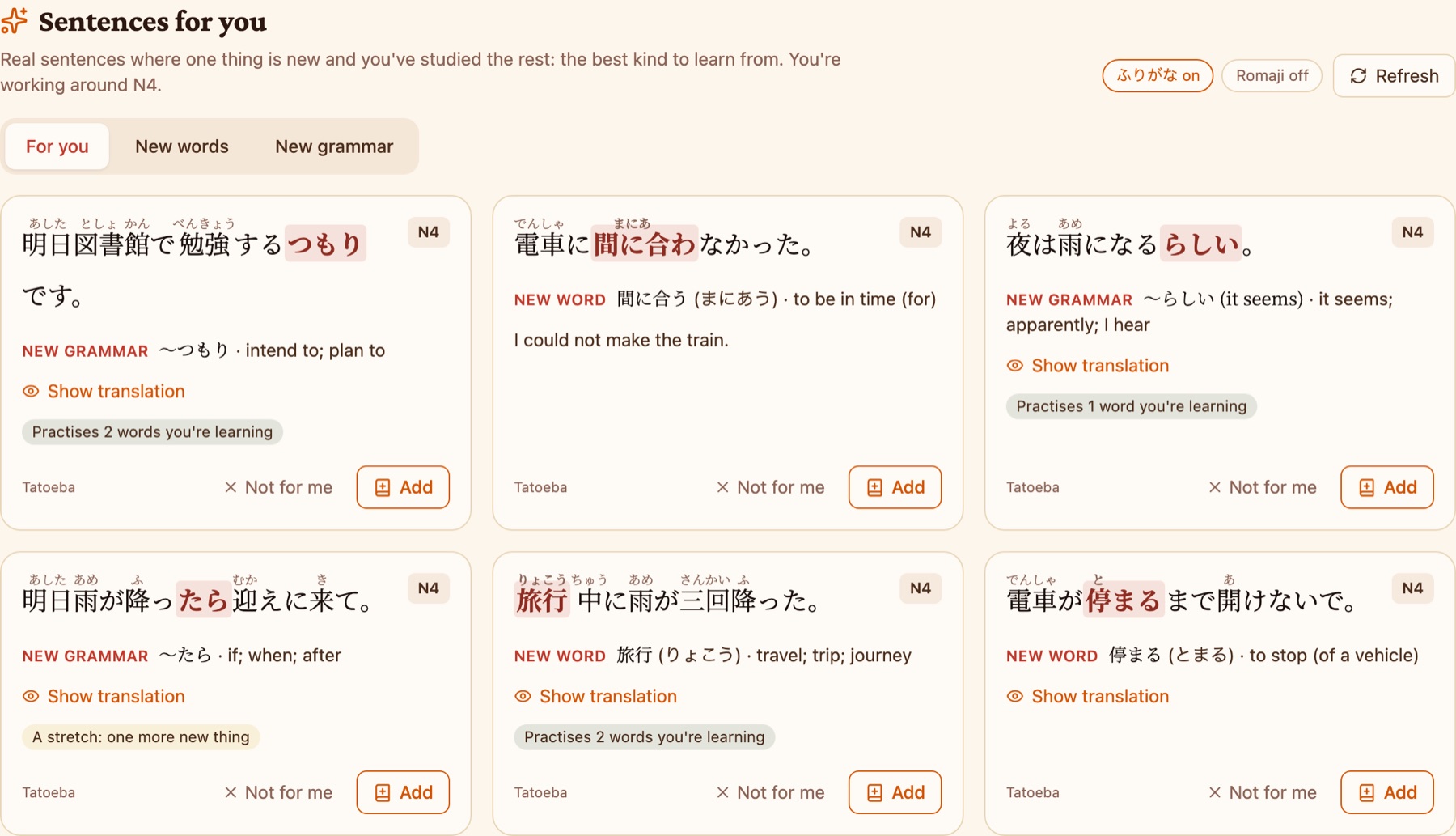
How it picks them:
- Real sentences first. They come from Tatoeba, about 227,000 of them, and each one links back to its page there.
- The new thing is chosen the same way as your other recommendations. If Momiji would recommend a word or grammar point to you next, it looks for sentences that teach exactly that.
- It helps your reviews too. Sentences that use words you’re still shaky on get a small boost, and a tag says “Practises 2 words you’re learning”.
- Stretches. If there aren’t enough sentences with one new thing, a sentence with two can fill in, and it’s labelled “A stretch”.
- AI only fills gaps. When no real sentence teaches something you should learn next, Momiji asks the AI to write a few at your level. It sends the word or grammar point and your level, nothing about you. Every AI sentence is checked by the same parser as everything else and only kept if the new thing really is the only new thing. They’re labelled “Written by AI” and have a report button if one sounds wrong.
Because this one uses the AI and is new, it’s behind a feature flag for now, and I’m turning it on for a few people at a time to see how it goes. If you’d like to try it, ask on the Discord.
Scanning sentences from photos and book pages
Typing sentences out of a book is slow, especially when you can’t read half the kanji yet, which is exactly when you need them. Now a sentence deck’s Add sentences tab has a From a book or manga option. Choose a photo or PDF, or on a phone take a photo with the camera, then drag a box around a sentence, a speech bubble or even a whole page. Momiji reads the Japanese in the box, you fix anything it got wrong, and add it to your deck like a sentence you typed. Vertical and horizontal text both work.
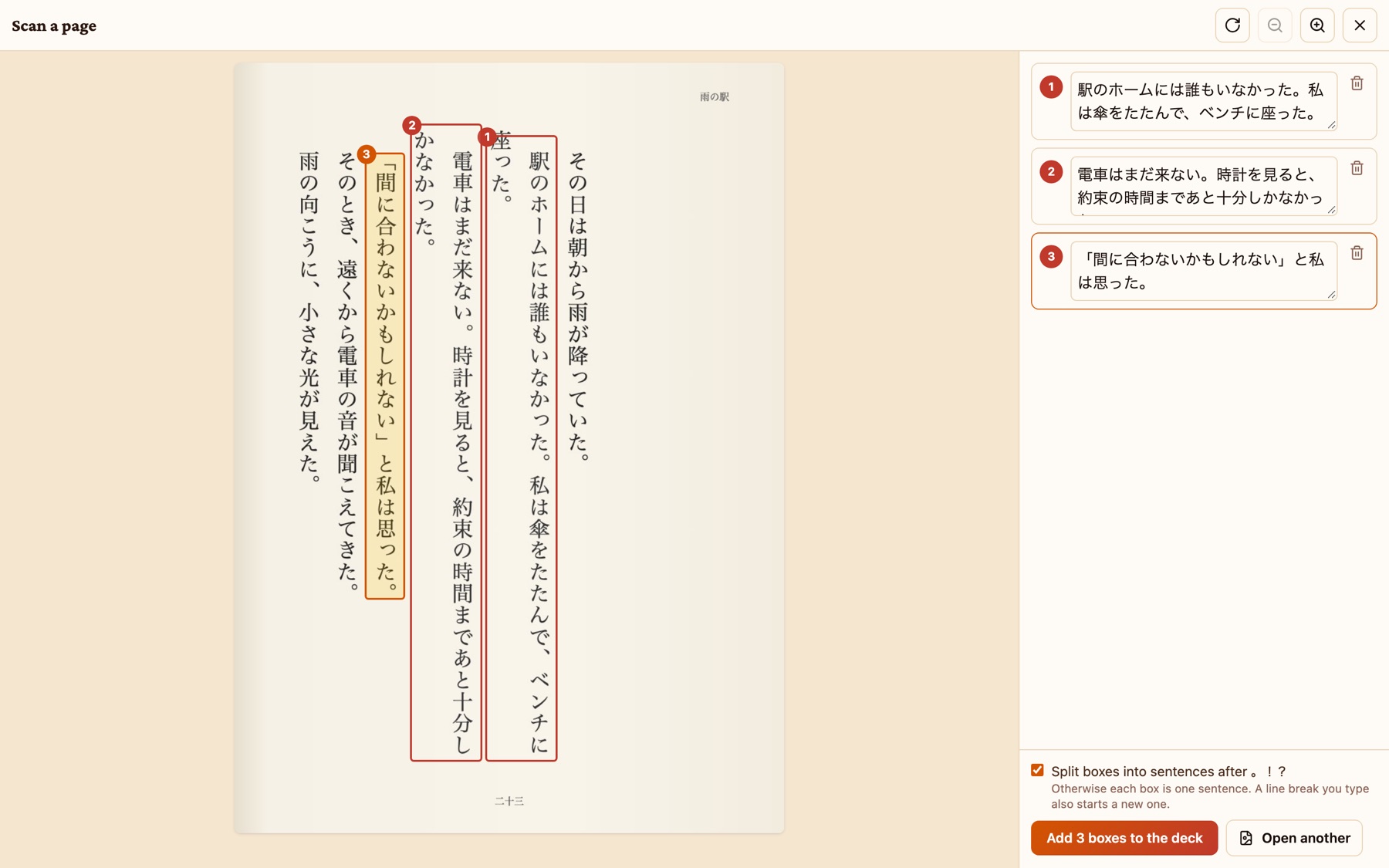
The reading is done by manga-ocr, which I run myself on Momiji’s server, so your pictures don’t go to a third party. Your page also never leaves your browser. Only the boxes you draw are sent, and they aren’t kept.
manga-ocr is built for speech bubbles, which are a few short lines. When I first gave it a whole book page it made up sentences that weren’t on the page at all. So now a big box is taken apart first: Momiji finds the text on the page, ignores shadows, your thumb and the page number, straightens the page if the photo is a bit tilted, and splits it into lines before it reads them. On my test pages, photos included, that went from mostly wrong to 95–100% right. If a box comes back with more than one sentence, Split boxes into sentences is ticked for you.
Scanning needs a free account, and you can read up to 300 boxes a day.
Words by level
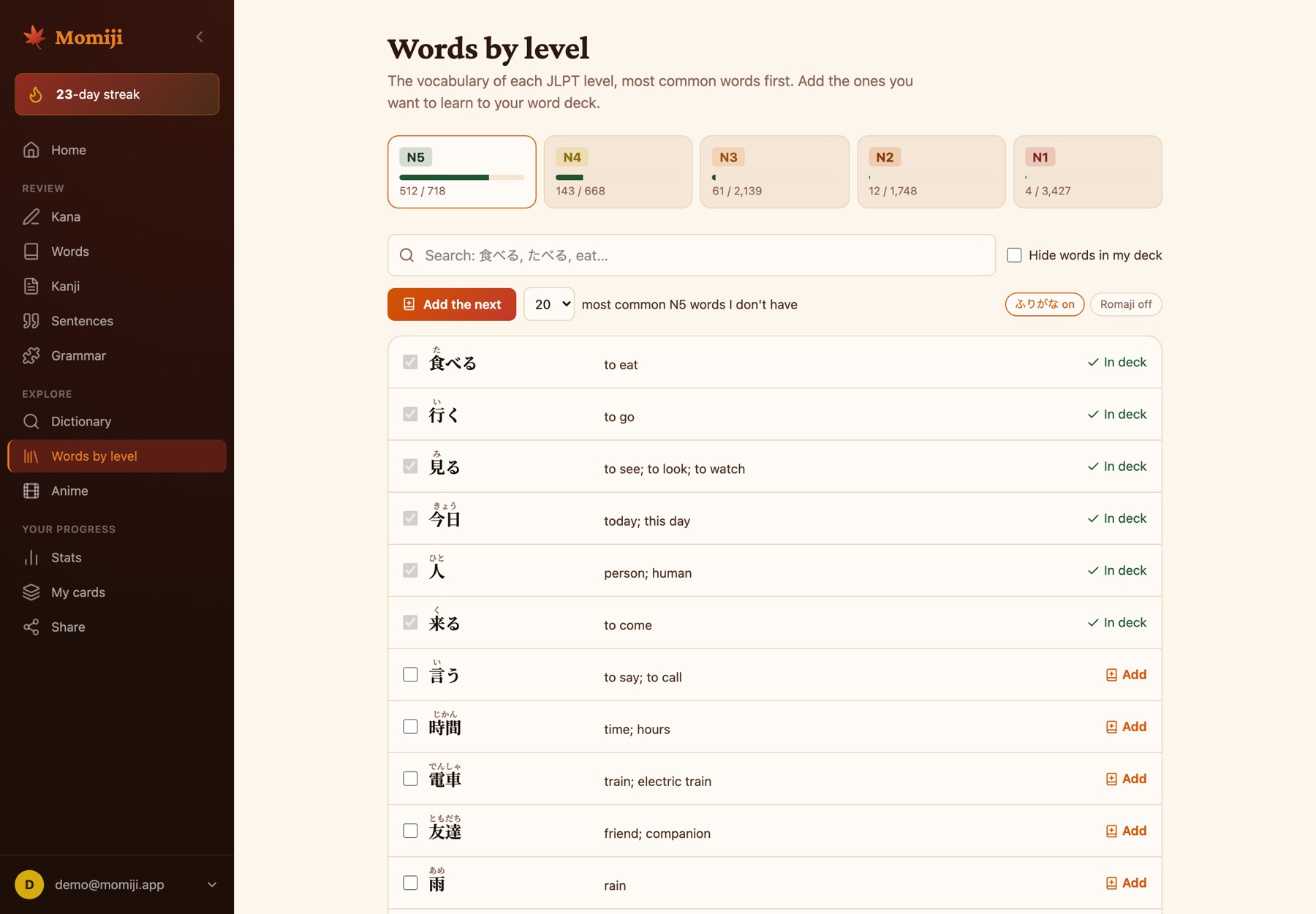
There’s a new Words by level page under Explore. It has every JLPT level’s vocabulary, most common words first, with how much of each level is already in your deck. You can add words one at a time, tick a few and add them together, or just add the next 10, 20 or 50 most common words of that level you don’t have yet. Like everything else for beginners, it has furigana and a romaji switch.
JLPT levels per reading
While building that page I found the JLPT levels on words were wrong in a few ways. Momiji looked up a word’s kanji and its reading separately, so 上 read as かみ came out as N5 because 上 (うえ) and 紙 (かみ) are both N5. It also gave one level to a whole dictionary entry, so 明日 was N5 even when read as みょうにち. And words that the lists write in kana, like これ, とても and かわいい, never got a level at all.
Now a level is matched to the exact word and reading, and each reading of a word gets its own level. That gave 1,748 more words a level, took a wrong level away from 114 and changed it for 41. The browser extension now shows the level of the reading it’s showing you, too.
Grammar round 2
After the last post I compared Momiji’s 340 grammar points with three public JLPT grammar lists (JLPT Sensei, Hanabira and OpenJLPT). Around 195 points showed up in two or more of those lists but not in Momiji. So I added them in two rounds, first the ones every list has and then the ones two lists have. The catalog now has 519 points: 60 at N5, 90 at N4, 93 at N3, 124 at N2 and 152 at N1. 450 of them have rules that find them in your sentences, and the rest are lesson-only.
I also moved ten points to the level all the lists agree on. For example ~たばかり and ~がる went down to N4, and ~ついでに and ~だらけ went down to N3. Variants that the lists count separately, like ~ねばならない, are now part of the point they belong to instead of being separate points. Your existing sentences get re-checked in the background so the new points show up in them.
Share your progress
You can now share your progress. Turn it on under Share in the sidebar and you get a public link, momiji.app/u/…, plus a card and a small badge you can put on a website, a forum signature or a GitHub profile. They show your estimated JLPT level, how close you are to the next one, your streak, and how many words and kanji you’ve learned. A link posted in Discord, X or Bluesky turns into a card on its own.
The link opens a page that shows how that level is worked out, instead of just repeating the card:
- Vocabulary by JLPT level, with a line on each bar at 60%. A level counts once you’ve learned 60% of its words and of every easier level’s.
- How the level is worked out. The JLPT hasn’t published official word lists since 2010, so it’s an estimate from community lists, and the page says so.
- Kanji by school grade, from Japan’s official Jōyō list.
- Grammar by JLPT level and kana.
- The anime you can follow best: how much of what’s said in each show you know, counting each word as often as it’s spoken.
- Study habits, and if you turn it on, a study calendar for the last six months.
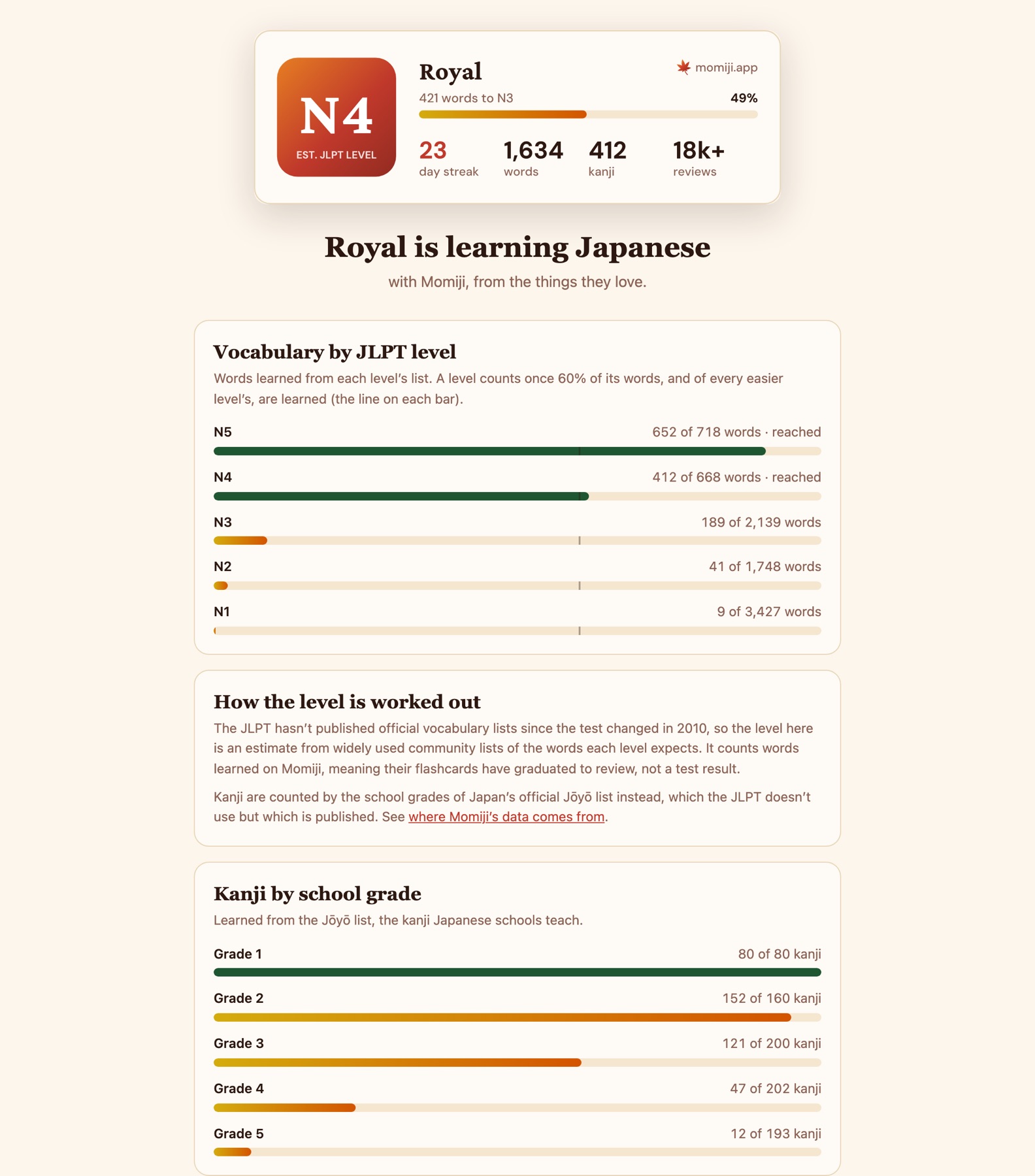
Sharing is off unless you turn it on, and it only shows the display name you pick, nothing else from your account. You can stop sharing or move to a new link whenever you want. Display names that look like links, emails or Momiji staff aren’t allowed, and every public page has a link to report it.
The streak in the sidebar also changed. It used to count the days you opened Momiji, while Stats counted the days you actually reviewed something, so the two numbers disagreed. Now the sidebar shows the study streak, the same one as Stats and your progress page, and it goes up right after your first review of the day.
The community page
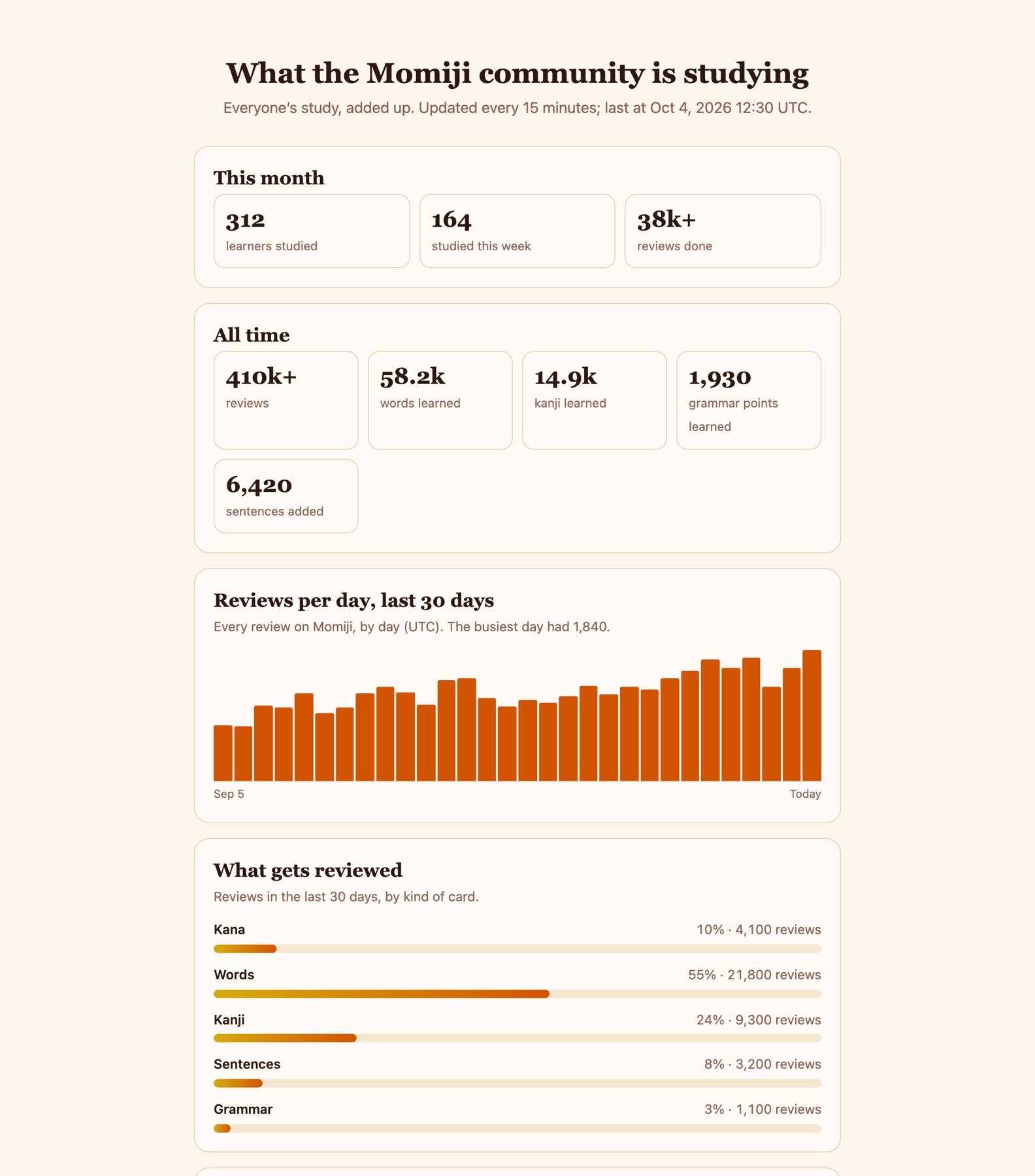
There’s a new public page at momiji.app/community that adds up what everyone on Momiji is studying: how many people studied this month, reviews per day, what kinds of cards get reviewed, where learners are by JLPT level, streaks, and the words, kanji, grammar and shows people study most. It’s only totals. A word or show is only listed once at least three different people have studied it, so nothing on it points back to one person.
Smaller things
- Kana and kanji have their own pages. They used to share a page with tabs. Now they’re separate entries in the sidebar, and Kana is first under Review.
- New kana are shuffled. When you add a new row of kana, its first review is no longer always あいうえお in order, which made it too easy to just recite.
- An expired session sends you back to sign in. If you left a tab open long enough for your session to run out, pages used to quietly fail to load. Now Momiji takes you to the login page and back to where you were afterwards.
- Phones. The sentence deck tabs no longer go off the side of the screen, and the landing page’s header links show on phones in a row under the logo instead of disappearing.
- The landing page now leads with “Learn Japanese from the things you love”, and all its screenshots are retaken from the current app.
- Momiji is on Instagram at @momijijapaneselearning. It’s linked from the site footer and this blog.
What’s next
Next is opening Sentences for you up to more people once I’ve seen how the first few use it, and finishing a “Today” section for progress pages. If you scan pages, please send me the ones Momiji reads badly on the Discord. Those are the best way to make it better.